Description
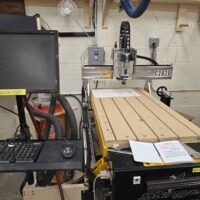
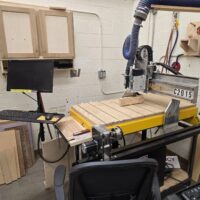
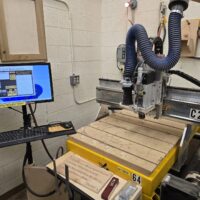
The Stinger 24″ × 48″ CNC Router is a computer-controlled cutting machine designed for precision routing, carving, and machining of wood and other approved materials. It uses a rotating cutting bit that moves in the X, Y, and Z axes under CNC control to accurately follow programmed toolpaths.
With a 24-inch by 48-inch cutting area, the Stinger is well suited for panels, signs, furniture components, templates, and detailed carving work. Material is securely clamped to the flatbed table while the router executes the programmed operations with high repeatability and accuracy.
The Stinger CNC router is capable of performing a wide range of operations, including profile cutting, pocketing, drilling, engraving, and 2.5D or 3D carving. Because it removes material mechanically, proper work-holding, correct tooling, and dust collection are essential for safe and effective operation.
While CNC automation controls tool movement, the operator remains responsible for setup, material selection, and supervision. Understanding the machine’s capabilities, limits, and safety requirements is critical to producing successful results and preventing equipment damage or injury.
⚠️ Warnings
Training is Required! You cannot reserve time on the machine until you go through training and have been approved by the instructor. You can sign up for instruction here.
Mechanical cutting hazard: The rotating router bit can cause severe injury instantly. Never place hands near the cutter while the machine is running or during spindle coast-down. Keep the machine enclosed and remain clear of moving parts at all times.
Secure work-holding is mandatory: Improperly clamped or unsecured material can shift or be thrown from the table, causing tool breakage, machine damage, or injury. Always verify that material is firmly secured before starting a job.
Usage Instructions
- These instructions are not a replacement for taking the class. You MUST take the class before using these machines.
- Reserve time on the CNC router in advance according to shop scheduling procedures.
- Inspect the machine before use. Ensure the table is clear, guards are in place, and dust collection is operating.
- Wear required PPE. Safety glasses are required; hearing protection is recommended.
- Verify material is approved for CNC routing and free of metal, fasteners, or embedded debris.
- Secure the workpiece firmly to the table using clamps, fixtures, or approved hold-down methods.
- Install the correct cutting bit and ensure it is properly seated and tightened.
- Load the CNC program and verify tool-paths, orientation, zero points, and cut depths.
- Set the work zero and tool zero as you learned in class.
- Perform a dry run or test pass when running a new file or setup.
- Start the program and monitor continuously. Never leave the machine unattended while running.
- Be prepared to stop the machine immediately if abnormal sounds, vibration, or unexpected motion occur.
- After the job is completed, return the machine a neutral position as required for each machine.
- Turn off the machine, computer and air pressure after the job is complete and proceed to Cleaning.
Cleaning
- Remove all chips and debris from the table, spoil board, and surrounding area using a vacuum or brush.
- Inspect and clear the dust collection intake to ensure proper airflow if you used it.
- Clean debris from the gantry, rails, and linear guides without disturbing alignment.
- Remove loose chips from around the spindle and tool holder.
- Sweep the floor around the machine to remove sawdust and debris.
- Return clamps, fixtures, spoil boards and tools to their designated storage locations.
- Report excessive buildup, damage, or abnormal conditions to a Floor Monitor.
- Leave the machine and area clean and safe for the next user.
Safety Issues
- High-speed cutting hazard The rotating router bit can cause severe injury instantly. Hands, clothing, or tools entering the cutting area can result in catastrophic injury.
- Work-piece ejection Improperly secured material can shift or be thrown from the table, damaging the machine or injuring the operator.
- Unexpected machine motion The gantry and spindle move automatically and can start suddenly during program execution or recovery.
- Tool breakage Incorrect feeds, speeds, or tooling can cause bits to snap and eject fragments at high speed.
- Dust and debris exposure CNC routing generates fine dust and chips that can affect visibility and respiratory health without proper dust collection.
- Noise exposure Prolonged operation can cause hearing damage without hearing protection.
- False sense of safety CNC automation does not prevent operator error, poor setup, or unsafe behavior.
- Fire risk Accumulated dust, improper feeds, or friction can generate heat and ignition under certain conditions.
- Improper material selection Cutting unapproved or contaminated materials can damage tooling and create hazards.
- Maintenance and setup hazards Changing tools, adjusting fixtures, or clearing jams without stopping the machine can lead to serious injury.