Description
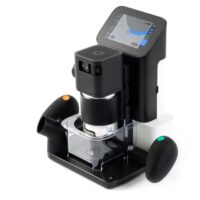
The Shaper Origin is a handheld CNC router that combines the familiar form factor of a traditional router with the precision of a high-end CNC machine. Unlike conventional CNC routers, the operator guides the tool by hand while the machine continuously makes small automatic corrections to stay precisely on the programmed path.
As you steer the tool by following the on-screen display, the Shaper Origin applies real-time positional adjustments within a ½-inch correction range, delivering highly accurate results without the need for clamps, fences, or templates. Joinery, profiles, patterns, and engraved signage can all be created directly on the tool, with no traditional CNC programming required.
The Shaper Origin integrates easily with most common design software, allowing users to import existing designs or create new ones using familiar tools. This combination of manual control and CNC precision makes the Shaper Origin especially useful for precision joinery, inlays, and large or awkward workpieces that are impractical to place on a traditional CNC machine. More Information here.
Our library has several computers with all the necessary software preloaded.
⚠️ Warnings
Handheld cutter hazard: The Shaper Origin is still a high-speed router. Direct contact with the bit can cause severe injury instantly, regardless of CNC guidance. Keep hands clear of the cutter at all times and maintain full control of the tool.
False sense of safety: CNC guidance does not make the tool safe by itself. Loss of focus, improper setup, poor material registration, or forcing the cut can result in tool jump, loss of control, or damage to the workpiece and machine.
Training is required to sign up to use the Shaper Origin. Signup here.
Usage Instructions
- Sign up to reserve time on the machine and check out the key from the tool room.
- Inspect the Shaper Origin before use. Verify the cutter is properly installed, tight, and appropriate for the operation.
- Wear required PPE. Safety glasses are required; hearing protection is recommended.
- Prepare and secure the workpiece. Material must be flat, stable, and properly supported.
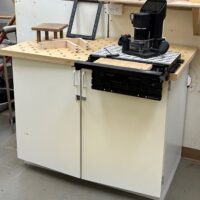
- Properly set up the work area with one of the two options.
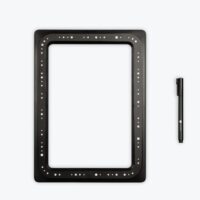
- Apply Shaper Tape correctly to establish accurate machine tracking and referencing.
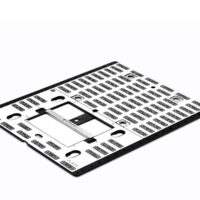
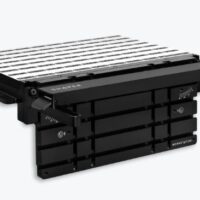
- User the Shaper Table which is marked for accurate tracking.
- Power on the tool and confirm system status before beginning any cuts.
- Load or create the design using the on-tool interface or approved design software.
- Set cut depth and pass limits appropriate for the bit and material.
- Perform cuts in multiple shallow passes. Do not force the tool or exceed recommended depth of cut.
- Maintain firm, controlled hand positioning and follow the on-screen guidance during cutting.
- Keep hands clear of the cutter path at all times.
- Pause or stop immediately if the tool behaves unexpectedly or loses tracking.
- Turn off the tool and wait for the cutter to stop completely before setting it down.
- Return the key and clean the work area according to shop policy.
Cleaning
- Turn off the Shaper Origin and wait for the cutter to stop completely before cleaning.
- Remove the cutter if required by shop policy and store it properly.
- Clean chips and dust from the tool body, base, and vents using a brush or vacuum.
- Remove Shaper Tape from the workpiece and surrounding surfaces.
- Clear the work surface and surrounding area of debris and offcuts.
- Inspect the tool for damage or unusual wear and report issues to a Floor Monitor.
- Return the Shaper Origin and key to the tool room according to shop policy.
- Leave the work area clean and safe for the next user.
Safety Issues
- High-speed cutter hazard The Shaper Origin uses a spinning router bit that can cause severe injury instantly on contact.
- Hand proximity risk Because the tool is handheld, poor hand placement can bring fingers dangerously close to the cutter.
- False sense of safety CNC guidance assists accuracy but does not prevent unsafe operation, loss of control, or operator error.
- Tool jump or loss of tracking Improper Shaper Tape placement, poor surface registration, or forcing the cut can cause unexpected tool movement.
- Excessive depth of cut Cutting too deeply in one pass can cause the tool to grab, stall, or move unpredictably.
- Inadequate workpiece support Unstable or unsecured material can shift during cutting, increasing loss-of-control risk.
- Loose clothing and entanglement Sleeves, gloves, jewelry, or long hair can be caught by the spinning bit.
- Bit failure or loosening Improperly installed, damaged, or incorrect bits can loosen or break during operation.
- Coasting cutter The bit continues spinning briefly after power-off and remains hazardous.
- Distraction during operation Because the operator actively guides the tool, loss of focus significantly increases accident risk.